



Paste one URL into Claude or ChatGPT. Approve a consent screen. From that moment the assistant answers with the account's own Semantika data: how ChatGPT, Claude, Gemini, Perplexity and Google AI Overviews talk about a brand, and what to fix first. No API key to generate, copy or paste. Nothing to install. Semantika is the AI search visibility platform we build at Buzzvel. Both directories list it as of this month.
This post is the recipe: what the clients expect from your server, the four pieces you build yourself, the one step that bites, and what the Anthropic and OpenAI reviews asked for before they listed it. It is also a fair picture of what it takes to put your own product inside Claude and ChatGPT. It assumes you know what MCP is: the protocol Claude, ChatGPT and other assistants use to call tools on a remote server over HTTP.
Stack, as of September 2026: Laravel 13, Passport 13, laravel/mcp 0.7.
What an MCP client expects from your server
When a user pastes your URL, Claude and ChatGPT do four things:
Fetch a discovery document from a well-known path on your domain. It says where to register, where to send the user for authorization, and where to exchange codes for tokens.
Register themselves as an OAuth client, on the spot, with Dynamic Client Registration (RFC 7591). There is no dashboard where you paste a client ID.
Run the authorization code flow with PKCE. The user sees your consent screen and approves.
Call your MCP endpoint with a bearer token and list your tools.
Both directories also read the annotations on your tools. A read-only tool gets a lighter review than one that writes.
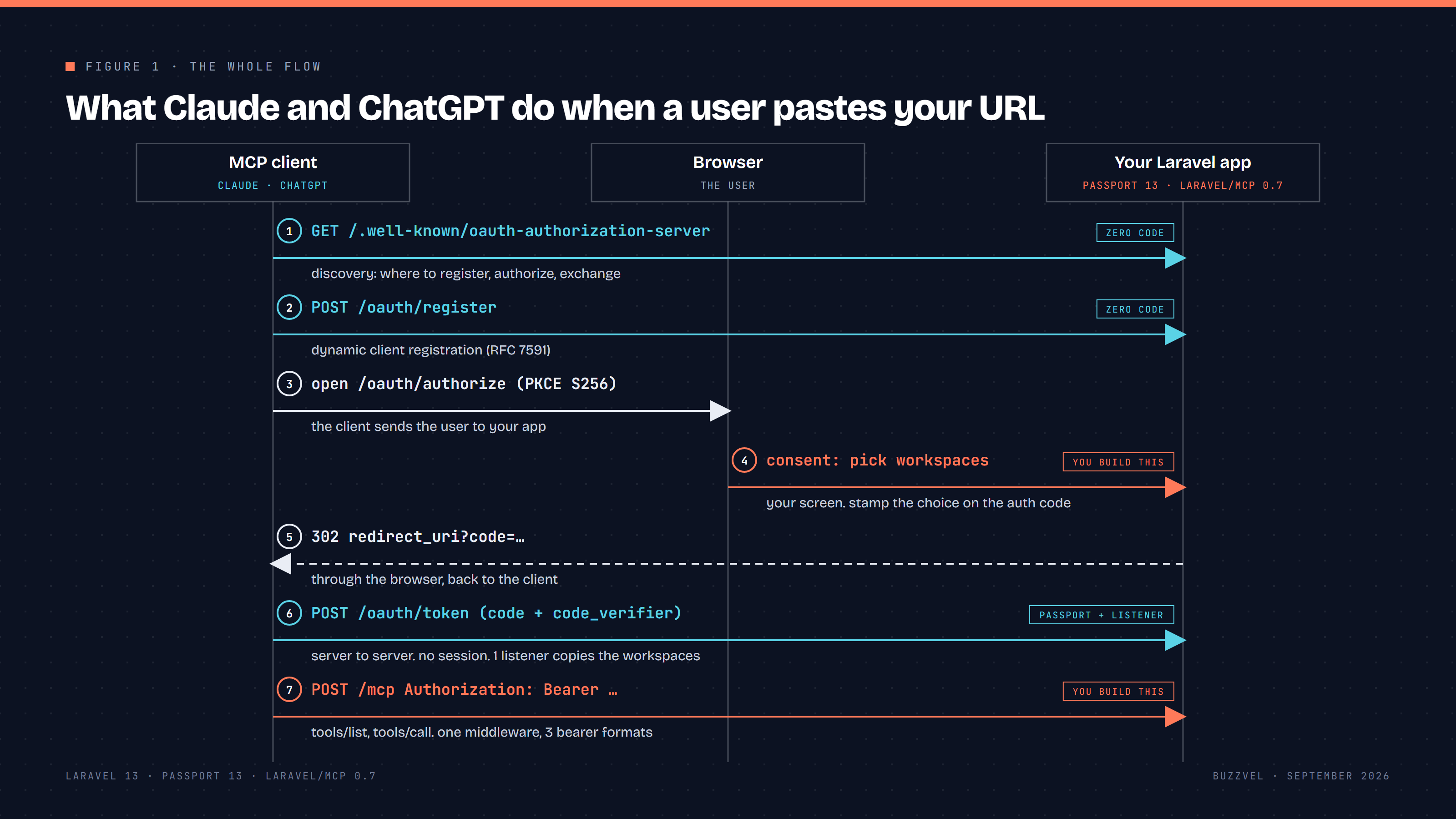
Figure 1. The whole flow. Cyan steps come with Passport and laravel/mcp. Orange steps are yours.
Step 1. Passport 13 is the authorization server
Passport 13 speaks OAuth 2.1 out of the box: authorization code with PKCE, and the password and implicit grants stay off unless you enable them. Do not enable them. Install Passport, run the migrations, and define one scope for the MCP endpoint.
// app/Providers/AppServiceProvider.php

use Laravel\Passport\Passport;

Passport::tokensCan([

'mcp:use' => 'Use the MCP tools for the selected workspaces',

]);
One scope is enough. The tenant restriction lives on the token, not in the scope. That is step 3.
Step 2. Discovery and client registration, zero code
laravel/mcp ships the discovery document and the registration endpoint. One call publishes both, a second call mounts the server.
// routes/ai.php

use Laravel\Mcp\Facades\Mcp;

Mcp::oauthRoutes();

Mcp::web('/mcp', AppMcpServer::class)

->middleware(AuthenticateMcpRequest::class);
After this, GET /.well-known/oauth-authorization-server answers, POST /oauth/register creates a Passport client, and Claude and ChatGPT find their way in. Resist hand-registering the two clients. Every other MCP client that appears next year would break.
Step 3. The consent screen and the trap
Passport gives you /oauth/authorize. The screen is yours. In a single-tenant app it is a button. In Semantika a workspace holds the brands a team monitors, so the user picks which workspaces the assistant may read. One or more.
Here is the trap. Consent happens in the browser, inside the user's session. The token exchange that follows is a server-to-server POST /oauth/token from Anthropic's or OpenAI's backend. No cookie, no session, no memory of what the user picked. Store the choice in the session and read it when the token is created, and you read nothing.
The fix is to stamp the choice on the authorization code, at consent time, in the request that creates the code.
// app/Http/Controllers/OAuth/ApproveAuthorizationController.php

public function approve(Request $request)

{

// Only workspaces this user can actually access.

$allowed = $request->user()->workspaces()

->whereIn('id', $request->input('workspace_ids', []))

->pluck('id')

->all();

abort_if($allowed === [], 422, 'Select at least one workspace.');

$request->session()->put('oauth.consent.workspace_ids', $allowed);

return parent::approve($request);

}
// app/Models/Passport/AuthCode.php
protected static function booted(): void
{
static::creating(function (self $code) {
$code->workspace_ids = session('oauth.consent.workspace_ids', []);
});
}Register the model with Passport::useAuthCodeModel(AuthCode::class) and add a JSON column. The code row now carries the tenant list, and the code is the one thing the client sends back. Validate the ids against the user's real access on the server. The form can be edited.
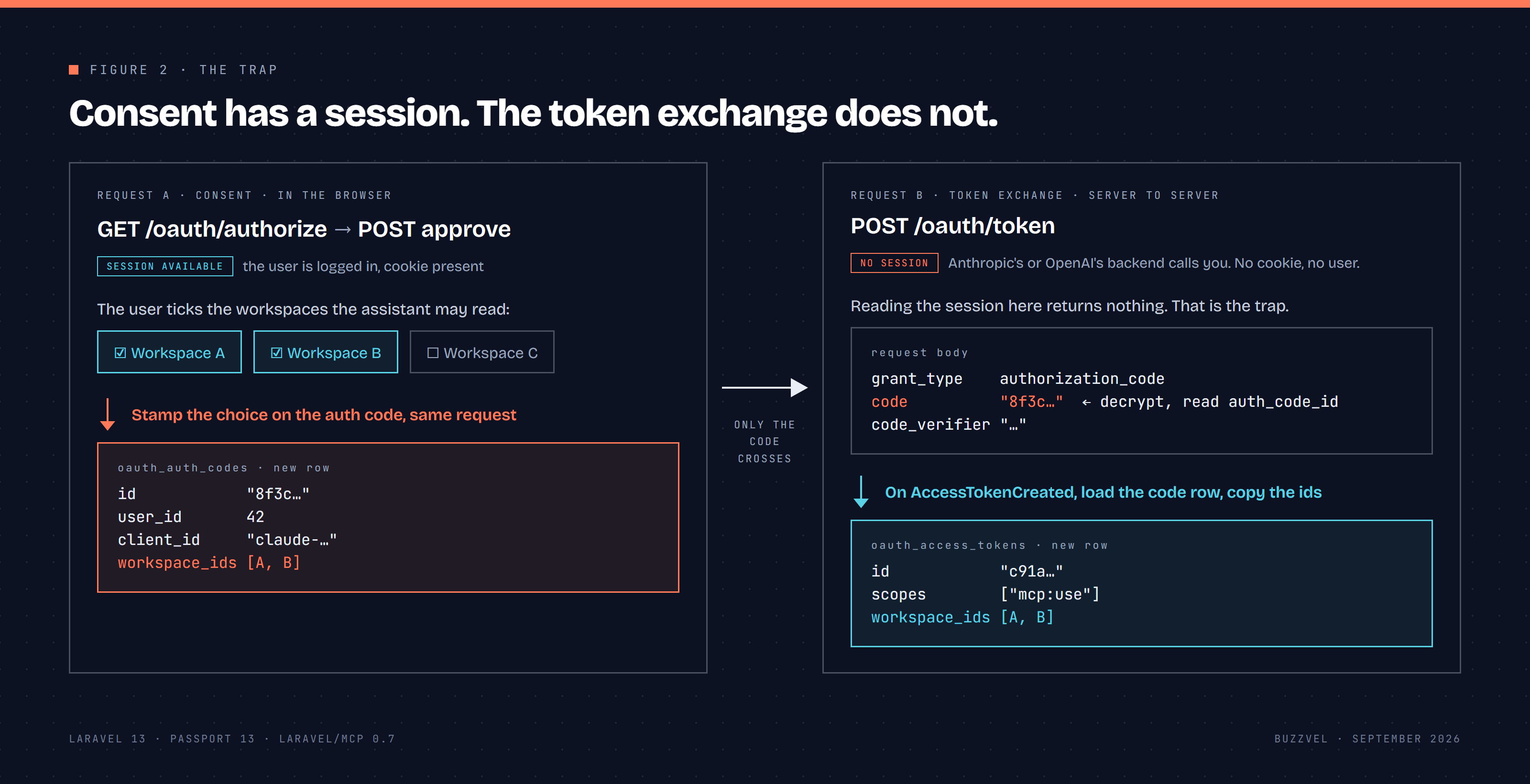
Figure 2. The trap. Only the code crosses from the consent request to the token exchange.
Step 4. Copy the choice to the access token
When Passport creates an access token it fires AccessTokenCreated with the token, user and client ids. Listen to it, find the code that started the exchange, and copy the ids across.
// app/Listeners/AttachWorkspacesToAccessToken.php

public function handle(AccessTokenCreated $event): void

{

$code = $this->authCodeFromTokenRequest($event);

Token::find($event->tokenId)

?->forceFill(['workspace_ids' => $code?->workspace_ids ?? []])

->save();

}
The token request carries the code as the code field, encrypted with your app key. Decrypt it, read auth_code_id, load the row. Keep a fallback for the newest unrevoked code of the same user and client, and copy from the previous access token on refresh. Skip this step and every token is blind to its tenant.
Step 5. One middleware, three bearer formats
If your app already has an API, you have tokens in the wild. Semantika had personal access tokens created in the UI and older workspace API keys used by headless integrations such as Looker Studio. The MCP endpoint had to accept both plus the new OAuth tokens, or the switch would break someone. One middleware, dispatch by prefix, OAuth as the default branch.
public function handle(Request $request, Closure $next): Response

{

$bearer = (string) $request->bearerToken();

return match (true) {

str_starts_with($bearer, 'pat_') => $this->personalAccessToken($bearer, $request, $next),

str_starts_with($bearer, 'key_') => $this->legacyApiKey($bearer, $request, $next),

default => $this->oauthToken($request, $next),

};

}
The OAuth branch authenticates through the api guard, checks tokenCan('mcp:use'), reads workspace_ids from the token row and binds them to the request. Every tool reads the bound workspaces and nothing else.
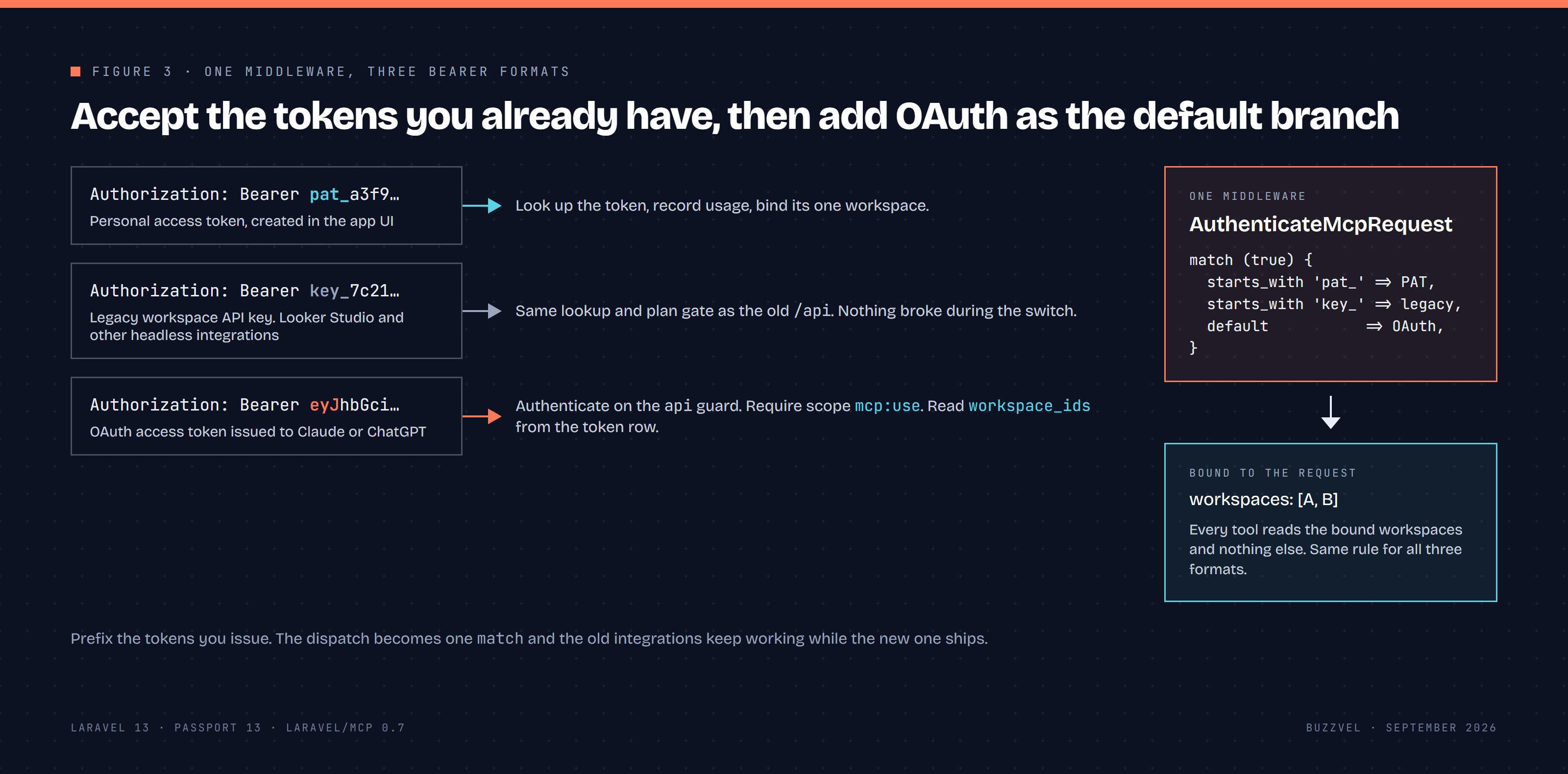
Figure 3. One middleware, three bearer formats.
Step 6. Tools a model and a person can both read
Tools are plain classes. Annotate each one.
use Laravel\Mcp\Server\Tool;

use Laravel\Mcp\Server\Tools\Annotations\IsReadOnly;

#[IsReadOnly]

class ListRecommendedActions extends Tool

{

protected string $description = 'List the open recommendations for the selected workspaces, newest first.';

public function handle(Request $request): Response

{

$lines = $this->actions()->map(fn ($a) =>

"- [{$a->title}]({$a->url}) · {$a->impact} · due {$a->due_at->toDateString()}"

);

return Response::text($lines->implode("\n"));

}

}
Two things in that snippet cost more time than the whole OAuth flow. The description is written for the model: it says what the tool returns and in what order, because the model picks tools by reading these strings. And every line carries a markdown link back into the app, [label](url), never a naked URL and never a bare ID. Without it the person ends the chat holding three numeric IDs and nowhere to click. That one came from watching a real session, not from a spec.
All six Semantika tools are read-only: list brands, a brand's visibility per engine, monitored prompts, recommended actions, one action in detail, and the latest report. A product decision, and it made both reviews shorter.
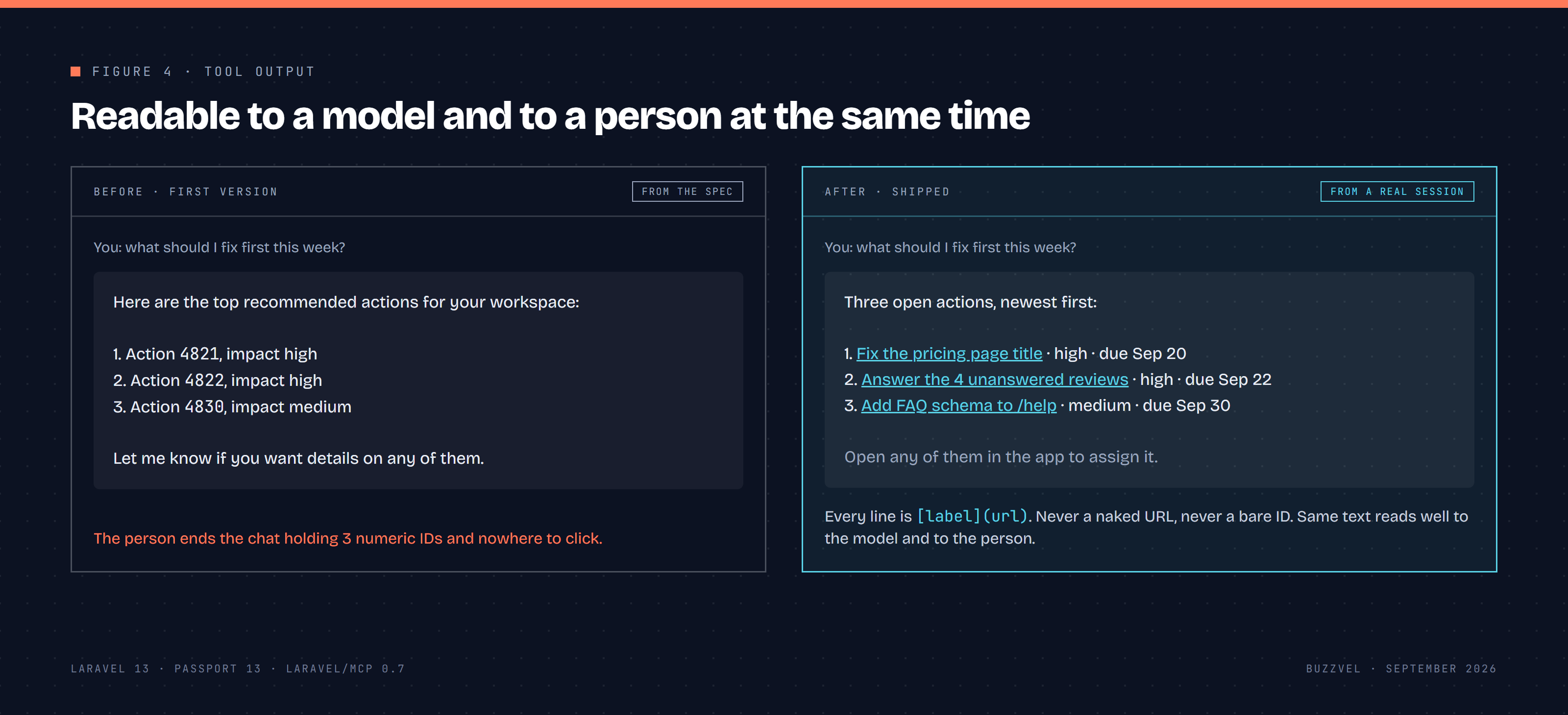
Figure 4. The same question, before and after the markdown links.
Step 7. Getting listed
At this point anyone can use the server as a custom connector. Getting Semantika into the two directories was a separate job, and most of it was not code. What follows is from the official docs as of September 2026, plus our own submission.
Before either form. Both reviews want the same five things: a published privacy policy that says what the connector reads, why, for how long and how to get it removed (Anthropic calls a missing one an immediate rejection); a support contact and a way to report security issues, for us a security@ mailbox with a short triage note; a public documentation page, one article is enough; a populated test account the reviewer can use without MFA, SMS or email confirmation; and every tool with a title and explicit annotations. Anthropic asks for readOnlyHint or destructiveHint. OpenAI asks for all three, including openWorldHint, and calls wrong or missing labels a common cause of rejection. In laravel/mcp that is IsReadOnly, IsDestructive and IsOpenWorld on every tool class. We had only the first and added the other two before submitting. Run every tool yourself in MCP Inspector first. Both portals ask you to confirm you did.
Anthropic Connectors Directory. Submission happens inside Claude.ai, under your organization's admin settings, so you need a Team or Enterprise organization and an Owner to submit. The portal pulls your tools from the live server, grouped by annotation, and flags any without a title or hint. The listing has hard limits: name 100 characters, tagline 55, description 2,000, and a slug that is permanent once published. You describe use cases and data handling, write access instructions for the reviewer, and sign seven policy acknowledgments, including prompt injection handling and not collecting conversation data. Feedback shows up in a submissions dashboard. Review time depends on the queue and the docs do not commit to a date, so submit early and do not tie a launch to it.
ChatGPT. OpenAI's portal lives in the Platform dashboard, and in 2026 the directory lists Apps SDK submissions as plugins. You need the Apps Management role and a completed identity verification, which reviewers match against the name, website and privacy policy in your listing. Four things differ from Anthropic:
Domain verification. The portal gives you a token and requests it from
/.well-known/openai-apps-challengeon the MCP hostname the moment you submit, as plain text and nothing else. Serve it from a small route outside the MCP prefix and return 404 when no token is configured, so a bad deploy never looks verified.Test cases. At least five positive and three negative. A negative case is not an error case. It is a prompt near your domain where the plugin must not trigger, or must ask instead of acting. We wrote 401s and invalid IDs first and had to redo them.
Scan Tools. The portal reads
tools/listfrom your server and compares it with the form. A mismatch is a review finding.Tool responses. Remove auth secrets, debug payloads, internal identifiers and undisclosed user fields from what tools return, and never link to checkout or upgrade pages. Step 6 seen from the other side.
After approval the plugin does not go live by itself. You publish it from the portal.
What the reviews came back with. Two changes, on the day of the ChatGPT submission, both metadata: the two missing annotations on every tool, and the server instructions, which now tell the model to identify every item by title, never by numeric ID, and to use only the links the tools returned. Neither took an hour. Both were in the guidelines. With those in, Semantika was approved and is listed in both directories.
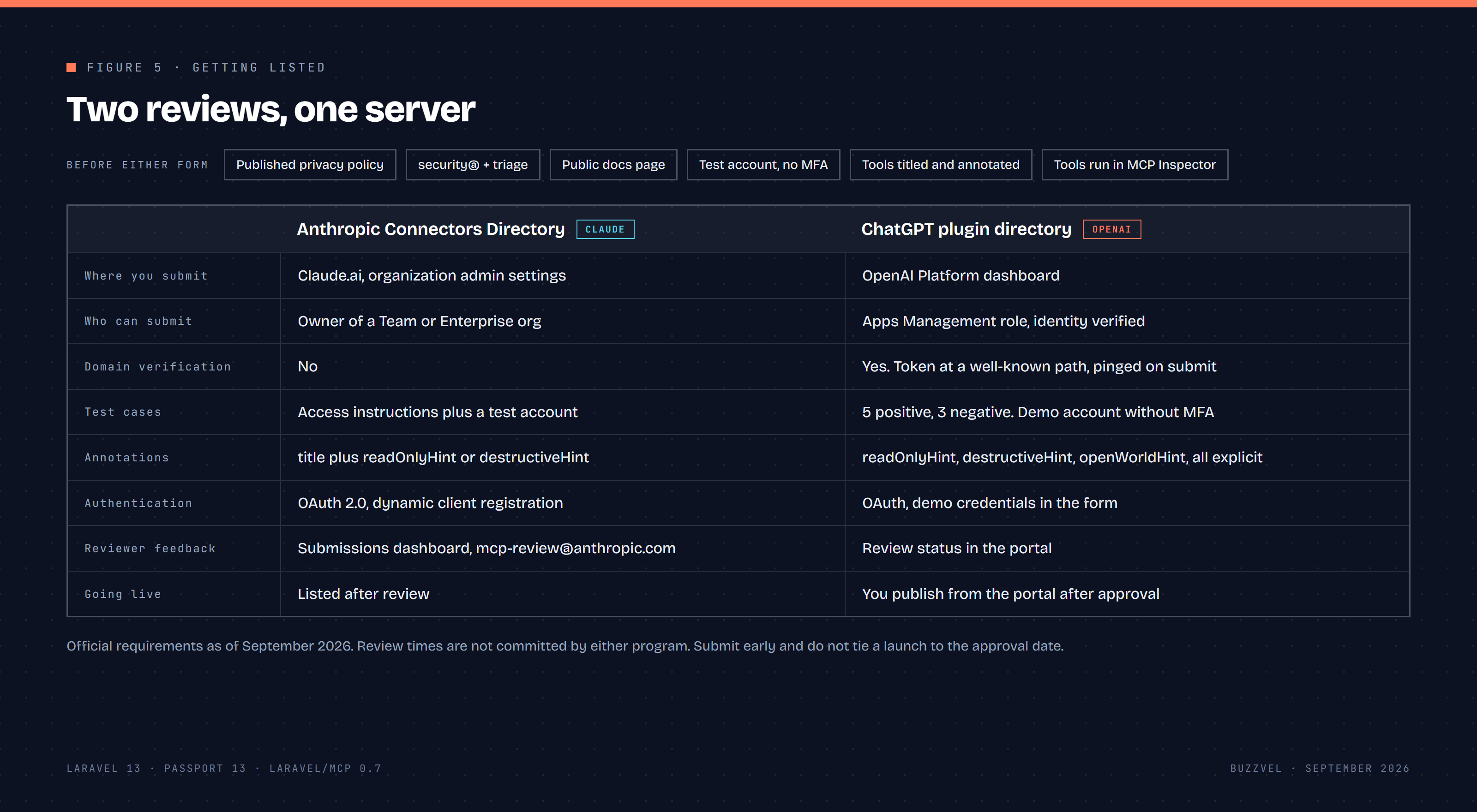
Figure 5. Two reviews, one server. What each one asks for.
Acceptance bar we set before starting: a new user connects with the URL alone in under 1 minute. It held.
What we did not expect
The OAuth code was the smaller half of the two weeks. Discovery, registration, PKCE and the token exchange are library work in 2026. The hours went into the consent screen, the tenant stamp, and making tool output readable to a model and to a person at the same time.
Semantika is in both directories. One URL, no API key, under 1 minute from paste to first answer. If you want your product inside Claude and ChatGPT, this is the kind of work we do at Buzzvel. Talk to us.

.jpg?v=1761303254)
.jpg?v=1761303275)

-hero.webp?v=1790336033 "GEO in 2026: How We Make Brands Visible in AI Search (and How We Measure It)")